
In the modern digital workplace, productivity depends heavily on how efficiently we manage information, tasks, and communication. As remote work, digital collaboration, and multitasking continue to increase, many professionals rely on productivity apps to organize their workflow.
Productivity apps are designed to help users:
- Manage tasks and projects
- Schedule meetings and deadlines
- Track time and progress
- Collaborate with teams
- Automate repetitive processes
These applications act as digital assistants, ensuring that important tasks are completed on time and information is organized properly.
With hundreds of productivity tools available today, selecting the right combination can significantly improve how individuals and teams work.
Table of Contents
What Are Productivity Apps?
Productivity apps are software tools designed to increase efficiency and reduce wasted time by organizing work, automating tasks, and improving collaboration.
Examples include:
- Task management apps
- Calendar and scheduling tools
- Note-taking apps
- Project management platforms
- Workflow automation tools
For example, time-tracking tools like Clockify or scheduling tools such as Google Calendar help users monitor work hours and plan deadlines effectively.
These tools transform scattered information into structured workflows that are easier to manage.
Key Features of Modern Productivity Apps
Modern productivity tools include several core features that improve workflow efficiency.
1. Task Management
Task management tools allow users to create task lists, assign priorities, and set deadlines.
Example features:
- Task reminders
- Progress tracking
- Priority tagging
- Subtasks
2. Time Tracking
Time management tools monitor how much time is spent on different activities.
Common capabilities include:
- Work timers
- Activity logs
- Productivity analytics
3. Collaboration Tools
Team productivity tools enable communication and shared workflows.
Examples:
- Shared dashboards
- Real-time document editing
- Comment systems
4. Automation
The Automation tools connect multiple apps and reduce repetitive work.
Automation examples:
- Automatically saving email attachments
- Syncing tasks between apps
- Creating reminders from messages
Major Categories of Productivity Apps
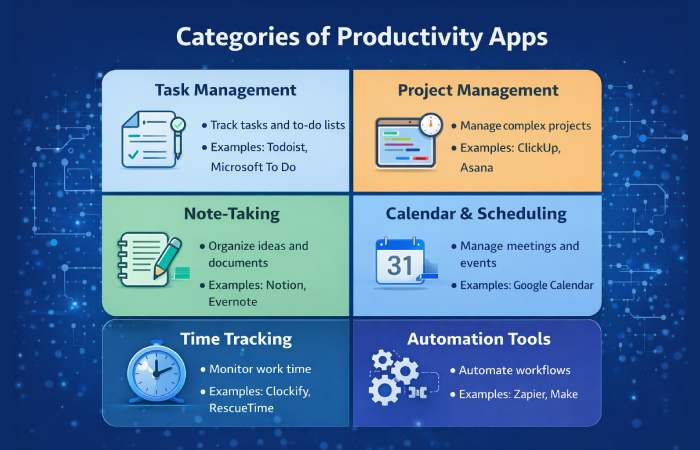
Productivity apps can be divided into several categories based on their primary functionality.
| Category | Purpose | Examples |
| Task Management | Track tasks and to-do lists | Todoist, Microsoft To Do |
| Project Management | Manage complex projects | ClickUp, Asana |
| Note-Taking | Organize ideas and documents | Notion, Evernote |
| Calendar & Scheduling | Manage meetings and events | Google Calendar |
| Time Tracking | Monitor work time | Clockify, RescueTime |
| Automation Tools | Automate workflows | Zapier, Make |
These categories cover the majority of productivity workflows in modern workplaces.
Best Productivity Apps in 2026
Below are some of the most widely used productivity apps across industries.
1. Notion
Notion is an all-in-one workspace combining notes, tasks, databases, and collaboration tools.
Key features:
- Custom dashboards
- Team collaboration
- Knowledge management
- Workflow automation
Notion is particularly popular among startups and remote teams because it allows users to create fully customized productivity systems.
2. Todoist
Todoist is one of the most widely used task management apps due to its balance of simplicity and powerful features.
Key features:
- Natural language task input
- Cross-platform syncing
- Priority levels
- Recurring tasks
Todoist supports lists, Kanban boards, and calendar views, making it flexible for both personal and professional workflows.
3. ClickUp
ClickUp is a comprehensive project management platform designed for teams managing complex workflows.
Key features:
- Task management
- Project timelines
- Collaboration tools
- Custom dashboards
ClickUp integrates with dozens of productivity platforms including Slack, Google Drive, and GitHub.
4. Microsoft To Do
Microsoft To Do is a simple yet powerful task management app integrated with Microsoft’s ecosystem.
Key features include:
- Smart checklists
- Daily planning tools
- Integration with Outlook
The “My Day” feature encourages users to select a focused list of tasks to complete each day, helping prevent overwhelm.
5. Google Calendar
Google Calendar remains one of the most widely used scheduling tools worldwide.
Key features:
- Event reminders
- Shared calendars
- Meeting scheduling
- Cross-device syncing
Many productivity systems rely on Google Calendar as the core scheduling platform.
Comparison of Popular Productivity Apps
Below is a comparison of several widely used productivity apps.
| App | Best For | Platform Support | Key Feature |
| Notion | All-in-one workspace | Web, mobile, desktop | Custom databases |
| Todoist | Task management | All platforms | Natural language tasks |
| ClickUp | Team project management | Web, desktop, mobile | Advanced dashboards |
| Microsoft To Do | Microsoft ecosystem users | Windows, mobile, web | Daily task planning |
| Google Calendar | Scheduling | Web, Android, iOS | Shared calendars |
Each tool addresses different productivity challenges, which is why many professionals combine multiple apps.
How Productivity Apps Improve Workflow
Productivity apps offer several advantages that improve how individuals and organizations work.
1. Better Organization
Instead of scattered notes and emails, productivity apps organize information into structured systems.
This makes it easier to:
- Track tasks
- Monitor progress
- Store knowledge
2. Time Efficiency
Automation and reminders reduce manual work.
Users spend less time remembering tasks and more time completing them.
3. Improved Collaboration
Teams can collaborate more effectively using shared dashboards and real-time communication tools.
4. Data-Driven Insights
Many productivity apps provide analytics that reveal how time and resources are used.
This helps teams optimize workflows and identify bottlenecks.
Productivity Apps for Different Use Cases
Different users require different productivity tools depending on their workflow.
Productivity Apps for Students
Students often use productivity tools for:
- Note taking
- Assignment tracking
- Study planning
Popular apps include:
- Notion
- Evernote
- Google Calendar
Productivity Apps for Professionals
Professionals require tools for:
- Project management
- Collaboration
- scheduling
Common apps include:
- ClickUp
- Asana
- Slack integrations
Productivity Apps for Developers
Developers often combine productivity tools with coding environments.
Examples include:
- GitHub Projects
- Jira
- Notion documentation
These platforms allow developers to track issues, manage projects, and collaborate with teams.
How to Choose the Right Productivity App
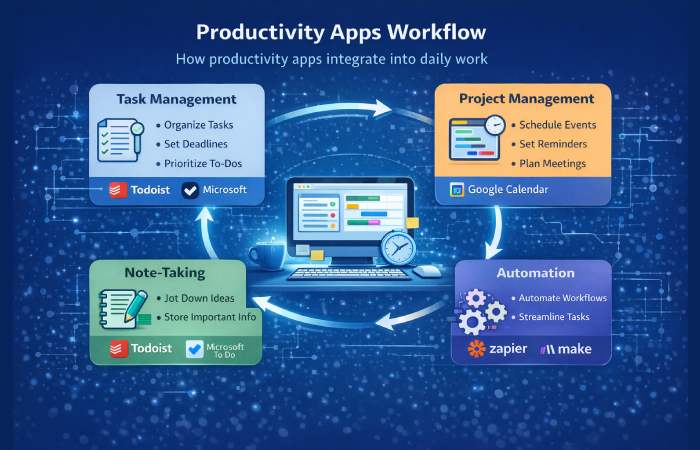
Choosing the best productivity tool depends on several factors.
Workflow complexity
Simple task lists may require only a to-do app, while complex projects require project management software.
Team collaboration
Teams require tools with shared dashboards and communication features.
Integrations
Good productivity apps integrate with email, calendars, file storage, and messaging platforms.
Ease of use
A productivity tool is only useful if people actually use it regularly.
Common Mistakes When Using Productivity Apps
Many users fail to gain real benefits from productivity tools because of incorrect usage.
Common mistakes include:
Using too many apps
Managing multiple apps can create complexity instead of reducing it.
Over-organizing
Spending excessive time organizing tasks can reduce actual productivity.
Ignoring automation
Many productivity apps include automation features that users never configure.
Future Trends in Productivity Apps
The productivity software landscape continues to evolve rapidly.
Major trends include:
AI-powered productivity tools
Artificial intelligence is increasingly integrated into productivity software to automate tasks and generate insights.
Unified workspaces
Many tools are moving toward all-in-one platforms combining tasks, notes, and collaboration.
Automation and workflow orchestration
Future productivity tools may automate entire workflows rather than individual tasks.
For example, recent AI-powered productivity tools can automatically organize tasks and execute them with minimal user input.
FAQ
What are productivity apps?
Productivity apps are software tools designed to help users organize tasks, manage time, collaborate with teams, and automate workflows.
What are examples of productivity apps?
Examples include Notion, Todoist, ClickUp, Microsoft To Do, and Google Calendar.
Are productivity apps free?
Many productivity apps offer free plans with basic features, while premium versions provide advanced functionality.
Do productivity apps actually improve efficiency?
Yes, productivity apps improve efficiency by organizing tasks, reducing manual work, and providing workflow insights.
Which productivity app is best?
The best productivity app depends on the user’s needs. For example:
- Todoist for task management
- Notion for knowledge organization
- ClickUp for project management
Final Conclusion
In today’s fast-paced digital environment, productivity apps have become essential tools for managing work efficiently. From simple task managers like Todoist to advanced platforms like ClickUp and Notion, these tools help individuals and teams organize information, automate workflows, and stay focused on important tasks.
The key to maximizing their benefits is choosing the right tools for your workflow and using them consistently. As productivity software continues to evolve with automation and AI features, mastering the right productivity apps will remain a crucial skill for professionals, students, and organizations aiming to work smarter in the modern digital world.