


Artificial intelligence is transforming the way people work. From writing emails to managing projects and automating repetitive tasks, AI productivity tools are now essential for professionals, entrepreneurs, and teams.
Recent research shows that 78% of companies are already using AI in at least one business function, demonstrating how quickly AI has become part of daily workflows.
At the same time, studies also show that using too many AI tools can reduce productivity and create cognitive overload, meaning the key is choosing the right tools for the right tasks.
In this guide, we’ll explore the best AI tools for productivity in 2026, including writing assistants, project management platforms, automation tools, and AI meeting assistants.
Table of Contents
TL;DR — Best AI Productivity Tools
If you want the quick answer, these are the top picks:
| Category | Best Tool |
| Best overall AI assistant | ChatGPT |
| Best for workplace integration | Microsoft Copilot |
| Best for writing and documentation | Notion AI |
| Best meeting assistant | Otter AI |
| Best automation tool | Zapier AI |
| Best AI research tool | Perplexity AI |
| Best team productivity platform | ClickUp AI |
These tools help automate tasks, improve collaboration, and reduce time spent on repetitive work.
Why AI Productivity Tools Are Growing So Fast
AI adoption in business has accelerated rapidly over the last two years.
Research shows:
- 71% of organizations now use generative AI regularly
- 44% of workers use AI tools for work tasks
- AI could add $15+ trillion to the global economy by 2030
Companies are integrating AI tools to:
- automate repetitive tasks
- improve decision making
- analyze data faster
- increase employee productivity
Because of this shift, AI tools are quickly becoming the digital assistants of the modern workplace.
Recent research shows that 78% of organizations report using AI in at least one business function, demonstrating how rapidly AI is being adopted in workplaces.
How AI Productivity Tools Improve Workflows
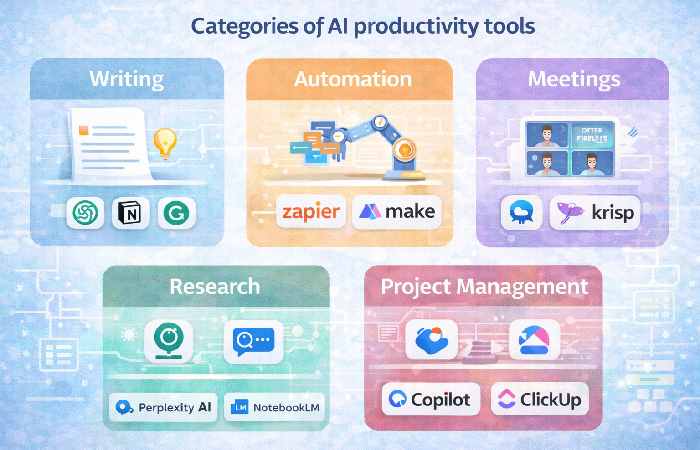
AI tools help professionals by handling tasks that normally consume time.
Common productivity improvements
- Writing and editing documents
- Automating repetitive workflows
- Summarizing meetings
- Generating reports
- Managing tasks and projects
- Analyzing large datasets
Instead of spending hours on manual tasks, AI tools allow workers to focus on creative and strategic work.
Top 12 Best AI Tools for Productivity in 2026
Below are the most useful AI tools based on features, ease of use, and real-world productivity impact.
1. ChatGPT
ChatGPT remains one of the most versatile AI productivity tools available.
Key features
- writing assistance
- coding help
- research summaries
- brainstorming
- document editing
Why it’s powerful
ChatGPT can act as a universal AI assistant for tasks like:
- writing blog posts
- drafting emails
- summarizing documents
- generating code snippets
Best for
General productivity and knowledge work.
2. Microsoft Copilot
Microsoft Copilot integrates AI directly into Office applications such as:
- Word
- Excel
- Outlook
- Teams
Key benefits
- automatic meeting summaries
- Excel data analysis
- email drafting
- document generation
Best for
Businesses already using the Microsoft ecosystem.
3. Notion AI
Notion AI combines project management with AI-powered writing tools.
Key features
- meeting notes
- task automation
- knowledge base creation
- document summarization
Why teams love it
Notion AI turns workspaces into AI-assisted productivity hubs.
4. Perplexity AI
Perplexity AI is a research-focused AI assistant that combines:
- web search
- AI summarization
- source citations
Best use cases
- research tasks
- industry analysis
- fact checking
5. ClickUp AI
ClickUp AI adds artificial intelligence to project management.
Key features
- task automation
- workflow generation
- document summarization
- team collaboration tools
Best for
Teams managing complex projects.
6. Zapier AI
Zapier AI automates workflows between apps.
Example automation:
Email received
↓
Create task in project manager
↓
Send Slack notification
This reduces repetitive work and increases efficiency.
7. Otter AI
Otter AI is one of the best AI meeting assistants.
Key features
- live transcription
- meeting summaries
- searchable transcripts
Many teams use Otter to automatically document meetings and save hours of manual note-taking.™8. Grammarly AI
Grammarly has evolved from a grammar checker into a powerful writing assistant.
Capabilities
- tone detection
- sentence rewriting
- clarity suggestions
- plagiarism detection
9. Fireflies AI
Fireflies is another AI meeting assistant that integrates with:
- Zoom
- Google Meet
- Microsoft Teams
It records meetings and automatically extracts important action items.
10. Gemini AI
Google Gemini integrates with Google Workspace tools.
Features
- AI document drafting
- spreadsheet analysis
- email generation
- research assistance
11. NotebookLM
NotebookLM is designed for research productivity.
Users can upload:
- PDFs
- articles
- notes
The AI then analyzes the content and generates summaries or answers questions.
12. Todoist AI
Todoist integrates AI into task management.
Key benefits
- natural language task creation
- intelligent task suggestions
- productivity insights
AI Productivity Tools Comparison Table
| Tool | Best For | Key Feature |
| ChatGPT | Writing & research | AI assistant |
| Copilot | Microsoft workflow | Office integration |
| Notion AI | Team productivity | AI workspace |
| Perplexity | Research | Source-based answers |
| ClickUp AI | Project management | Workflow automation |
| Zapier AI | Automation | App integrations |
| Otter AI | Meetings | Transcription |
| Grammarly | Writing | Editing assistant |
Studies indicate that using AI tools can increase worker throughput by up to 66% in certain task environments.
How to Choose the Right AI Productivity Tool
Choosing the right AI tools depends on your workflow.
For writers
- ChatGPT
- Grammarly
- Notion AI
For teams
- ClickUp AI
- Notion AI
- Copilot
Also For automation
- Zapier AI
For research
- Perplexity AI
- NotebookLM
The most effective strategy is to combine two or three complementary tools instead of using many at once.
Common Mistakes When Using AI Tools
Many professionals struggle to use AI tools effectively.
Common mistakes include:
- using too many AI tools at once
- relying on AI without verifying information
- ignoring security and privacy concerns
- automating tasks that require human judgment
Experts recommend integrating AI tools gradually into workflows.
The Future of AI Productivity
AI productivity tools are evolving rapidly.
Experts expect future tools to include:
- AI agents that complete entire tasks
- deeper automation integrations
- personalized AI assistants
- advanced workflow orchestration
With continued investment and adoption, AI is likely to become an essential part of everyday work.
FAQ
What is the best AI productivity tool?
ChatGPT and Microsoft Copilot are currently among the most versatile tools for productivity.
Are AI tools replacing jobs?
AI tools are designed to automate repetitive tasks and enhance productivity rather than completely replace workers.
How many AI tools should you use?
Experts suggest using two or three specialized tools instead of many platforms to avoid productivity overload.
Conclusion
AI productivity tools are transforming how people work. From writing and research to automation and project management, these tools help professionals complete tasks faster and focus on higher-value work.
As adoption continues to grow across industries, choosing the best AI tools for productivity can significantly improve efficiency and workflow management in 2026 and beyond.