
Cybersecurity Best Practices: A Practical Security Framework for Teams, Marketers, and Developers (2026 Guide)
Cybersecurity is no longer only an IT responsibility.
In modern digital teams, security risks often come from:
- shared marketing dashboards
- SaaS integrations
- analytics access permissions
- remote work environments
- cloud storage workflows
- browser-based productivity tools
That means marketers, developers, founders, and creators all need strong cybersecurity habits.
This guide explains the most important cybersecurity best practices for protecting:
- accounts
- business workflows
- customer data
- cloud platforms
- collaboration tools
- marketing technology stacks
Table of Contents
Why Cybersecurity Matters More Than Ever in 2026
Security risks are increasing because organizations rely on:
- remote infrastructure
- cloud services
- automation tools
- AI assistants
- API integrations
Modern attacks target access points instead of hardware.
Credential theft is now one of the most common entry methods in data breaches. (cisa.gov)
Quick Overview: Core Cybersecurity Best Practices
| Category | Action |
| Authentication | Enable MFA everywhere |
| Password safety | Use password manager |
| Device protection | Update OS regularly |
| Access control | Apply least-privilege model |
| Network security | Avoid public Wi-Fi risks |
| Monitoring | Review login activity |
| Backup systems | Maintain encrypted backups |
These practices prevent most avoidable attacks.
What Most Teams Misunderstand About Cybersecurity
Many people assume:
security tools solve security problems.
Reality:
security habits prevent breaches.
Most incidents happen because of:
weak passwords
phishing clicks
over-shared access
unsecured devices
Human behavior remains the biggest vulnerability.
Cybersecurity Best Practice #1: Enable Multi-Factor Authentication Everywhere
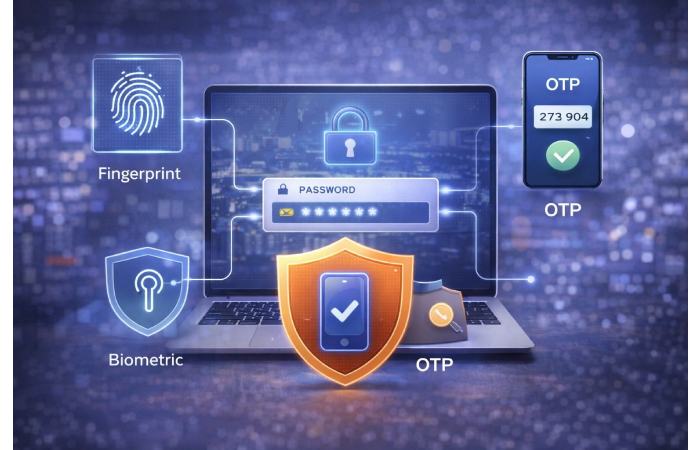
Multi-factor authentication (MFA) adds a second verification step beyond passwords.
Examples include:
- authenticator apps
- hardware keys
- SMS codes
- biometric verification
Organizations using MFA dramatically reduce account-takeover risks. (cisa.gov)
Enable MFA on:
email
cloud storage
analytics tools
ad platforms
CRM systems
code repositories
Cybersecurity Best Practice #2: Use a Password Manager
Password reuse creates the fastest path to account compromise.
Password managers help:
generate strong passwords
store credentials securely
auto-fill safely
reduce reuse risk
Never reuse passwords across platforms.
Cybersecurity Best Practice #3: Apply the Least-Privilege Access Model
Least-privilege means:
users only access what they need.
Examples:
designers don’t need billing access
interns don’t need admin permissions
vendors don’t need analytics ownership
Reducing permissions reduces breach impact.
Cybersecurity Best Practice #4: Secure Marketing Technology Stacks
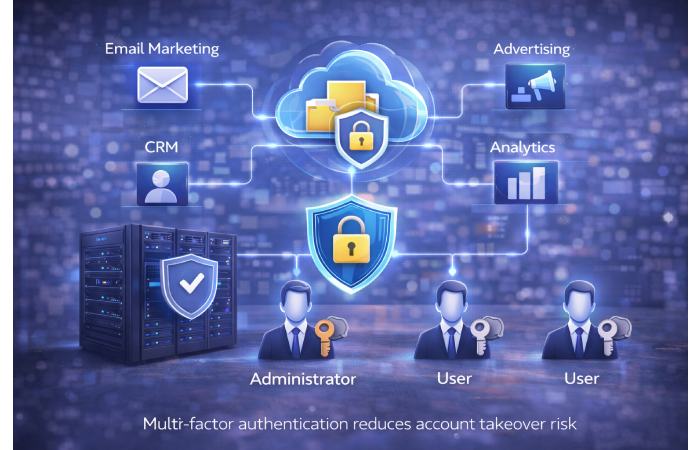
Marketing teams manage sensitive platforms including:
Google Analytics
Meta Ads Manager
CRM dashboards
email automation tools
SEO platforms
Compromised marketing access can expose customer data and campaign budgets.
Use:
separate admin roles
access expiration policies
login monitoring alerts
Cybersecurity Best Practice #5: Protect Against Phishing Attacks
Phishing remains the most common attack vector.
Signs of phishing attempts:
unexpected login alerts
urgent payment requests
fake support emails
credential-reset messages
Always verify sender identity before clicking links.
Phishing awareness training reduces breach risk significantly. (cisa.gov)
Cybersecurity Best Practice #6: Keep Software Updated Automatically
Updates fix security vulnerabilities.
Enable auto-updates for:
browsers
operating systems
plugins
security tools
Outdated software increases exploit risk.
Cybersecurity Best Practice #7: Secure Remote Work Environments
Remote teams should:
avoid public Wi-Fi
use VPN connections
lock screens automatically
separate work and personal devices
Remote workflows increase attack surfaces.
Cybersecurity Best Practice #8: Protect API Integrations
Marketing automation depends heavily on APIs.
Security risks include:
token leaks
unauthorized integrations
over-permissioned access
Audit integrations quarterly.
Remove unused connections.
Cybersecurity Best Practice #9: Monitor Login Activity Regularly
Review:
device logins
location access
unrecognized sessions
Unexpected login activity is often the first breach signal.
Cybersecurity Best Practice #10: Use Endpoint Protection Software
Endpoint protection includes:
antivirus
malware detection
threat monitoring tools
Endpoints remain primary attack targets.
Cybersecurity Best Practice #11: Encrypt Sensitive Data
Encrypt:
customer databases
financial records
internal documentation
Encryption protects data even after exposure.
Cybersecurity Best Practice #12: Maintain Secure Backup Systems
Backups protect against:
ransomware
accidental deletion
platform outages
Use:
offline backups
cloud redundancy
version history storage
Cybersecurity Best Practice #13: Separate Admin Accounts from Daily Accounts
Use:
one admin account
one standard account
Daily browsing should never use admin privileges.
Cybersecurity Best Practice #14: Train Teams Regularly
Security awareness training should cover:
phishing detection
password hygiene
device security
social engineering tactics
Training reduces breach probability significantly.
Cybersecurity Best Practice #15: Secure Browser Extensions
Extensions often request:
full page access
credential permissions
data tracking rights
Remove unused extensions regularly.
Cybersecurity Best Practices for Marketing Teams Specifically
Marketing teams should:
limit ad account ownership roles
enable billing alerts
audit integrations monthly
separate agency access levels
Marketing accounts are common takeover targets.
Cybersecurity Best Practices for Developers
Developers should:
protect API keys
rotate credentials
use environment variables
monitor repositories
Never store credentials inside codebases.
Cybersecurity Best Practices for Startups
Startups should implement:
MFA enforcement policies
backup automation
device-access policies
cloud permission mapping
Early habits prevent scaling risks.
Cybersecurity Best Practices for Remote Teams
Remote environments require:
secure VPN usage
device encryption
login monitoring
screen-lock policies
Remote access expands risk surfaces.
Cybersecurity Best Practices for Individuals
Individuals should:
avoid password reuse
enable MFA
update devices
monitor login alerts
Personal security protects business security.
Common Cybersecurity Mistakes Teams Make
Avoid:
shared passwords
unused integrations
admin-level access sharing
ignored update alerts
These cause most avoidable breaches.
When to Upgrade Your Security Strategy
Upgrade immediately if:
team grows rapidly
remote staff increases
customer data expands
API integrations multiply
Scaling increases risk exposure.
Who This Article Is For
Ideal readers:
marketers
developers
agency teams
startup founders
remote professionals
SaaS users
Who This Article Is NOT For
Not intended as:
enterprise compliance framework
penetration testing manual
SOC-level architecture guide
This is a practical operational security guide.
FAQs
What is the most important cybersecurity practice?
Enable multi-factor authentication everywhere.
Are password managers safe?
Yes. They reduce password reuse risks significantly.
Is antivirus still necessary in 2026?
Yes. Endpoint protection remains essential.
How often should security audits happen?
Quarterly minimum.
Are VPNs required for remote work?
Strongly recommended on public networks.
Conclusion
Modern digital workflows depend on secure access to cloud platforms, analytics tools, APIs, and collaboration environments. Following strong cybersecurity best practices such as enabling multi-factor authentication, limiting permissions, monitoring integrations, protecting endpoints, and training teams regularly helps organizations reduce risk dramatically while maintaining productivity across distributed teams and marketing technology stacks.